

Kickflip is a well-liked no-code product customizer for Shopify, WooCommerce and Wix, with photorealistic 2D previews and unlimited products. Zakeke does live customization too and goes further: real-time 3D configuration, AR, Virtual Try-On, production-ready files and Visual CPQ, on more ecommerce platforms, with a free trial and a path to Enterprise. If you sell simple products with a few options on one store and want the quickest possible setup, Kickflip is a good fit.
Choose Kickflip when you want a simple, polished 2D customizer on Shopify, WooCommerce or Wix, a large catalogue of simple products, and a roadmap that does not include 3D, AR or try-on.
Choose Zakeke when customization has to grow into 3D, AR or Virtual Try-On, when orders must reach production with print-ready files and data attached, when you sell on more platforms, and with a path from self-service to Enterprise.
| Comparison area | Kickflip | Zakeke |
|---|---|---|
| Core positioning | No-code visual product customizer for DTC brands | Visual commerce across personalization, 3D, AR, VTO, CPQ and 3D assets |
| 3D configuration | No: photorealistic 2D layered previews | Yes, full 3D product configuration |
| Visual CPQ | CPQ available as a paid add-on | Yes |
| Design to Print / personalization | Yes: live customization with dynamic pricing | Yes, with a dedicated Visual Product Customizer |
| AR | Not a documented Kickflip feature | Yes |
| Virtual Try-On | Not a documented Kickflip feature | Yes |
| Production-ready files | Yes: print-ready files flow to production | Yes: PDF/PNG/SVG/DXF |
| API | Works with custom stacks | Yes |
| Enterprise systems | Shopify, WooCommerce, Wix, custom stack | Native commerce plus API/PIM/enterprise |
| Self-management | Yes, no-code | Self-provisioning plus Enterprise |
| Pricing | USD 59 a month plus 1.95% to 0% per custom sale; unlimited products. | Published Starter, Grow and Scale plans plus Enterprise |
The difference is how far the product experience goes. Kickflip is a clean 2D customizer that a brand can put live in days on Shopify, WooCommerce or Wix, with photorealistic layered previews, unlimited products and little to learn.
Zakeke covers the same live customization and adds what happens beyond a 2D preview: real-time 3D, AR and Virtual Try-On, vector production files like SVG and DXF, more ecommerce platforms and an Enterprise setup with integrations and security certifications. Both offer a 14-day free trial, so the fairest test is the same product on both.
For many brands the choice comes down to the next product they plan to launch. If it is another colourway or another text option, Kickflip will handle it well. If it is a product people need to see from every side, place in a room, wear, or send to an engraver as a vector file, that is the point where the two tools stop overlapping.
Kickflip suits a DTC brand on Shopify, WooCommerce or Wix whose customisable products look right from a few fixed angles and whose priority is speed: drag-and-drop setup, conditional logic, dynamic pricing tied to options and no product cap, which matters for a very large catalogue of simple products.
Zakeke supports different visual-commerce use cases inside the same technology stack: printing businesses that need web-to-print and production-ready output, manufacturers selling configurable products, furniture brands combining 3D with AR, fashion and luxury brands using Virtual Try-On, and multi-category merchants that need different experiences for different products.
More than 25,000 brands use Zakeke, from a first Shopify store to manufacturers on Enterprise contracts, which is exactly the range this comparison is about.


A layered 2D preview answers what the product looks like from a few fixed angles. A real-time 3D configurator lets the shopper rotate it, swap parts and see materials change, AR puts it in their room, and Virtual Try-On puts glasses or jewellery on their face.
For many decorated products a 2D customizer is enough. For furniture, eyewear, jewellery, sports equipment and anything with changing geometry, it is the step that decides the sale, and it is where Kickflip and Zakeke stop being the same kind of tool.
The shift also affects imagery. With layered 2D rendering every option needs its own prepared images for each view; a 3D model renders new materials and angles from the same asset, which becomes an advantage as options and views multiply.
Both platforms send print-ready files to production, so both remove manual mockup and artwork work. Kickflip states that orders and print-ready files flow straight to production.
Zakeke generates PDF, PNG, SVG and DXF for every personalised order, following the print areas and rules you set. DXF and SVG are what a cutter, an engraver or a laser expects: if your production only prints, both are fine; if it also cuts or engraves, vector output becomes the job.
Zakeke also lets the merchant set print areas, fonts, colours, clipart and image uploads per product, so the file is correct before it is generated rather than fixed afterwards. For DTG, sublimation, screen printing and engraving, those rules are what keep reprints and customer emails low.
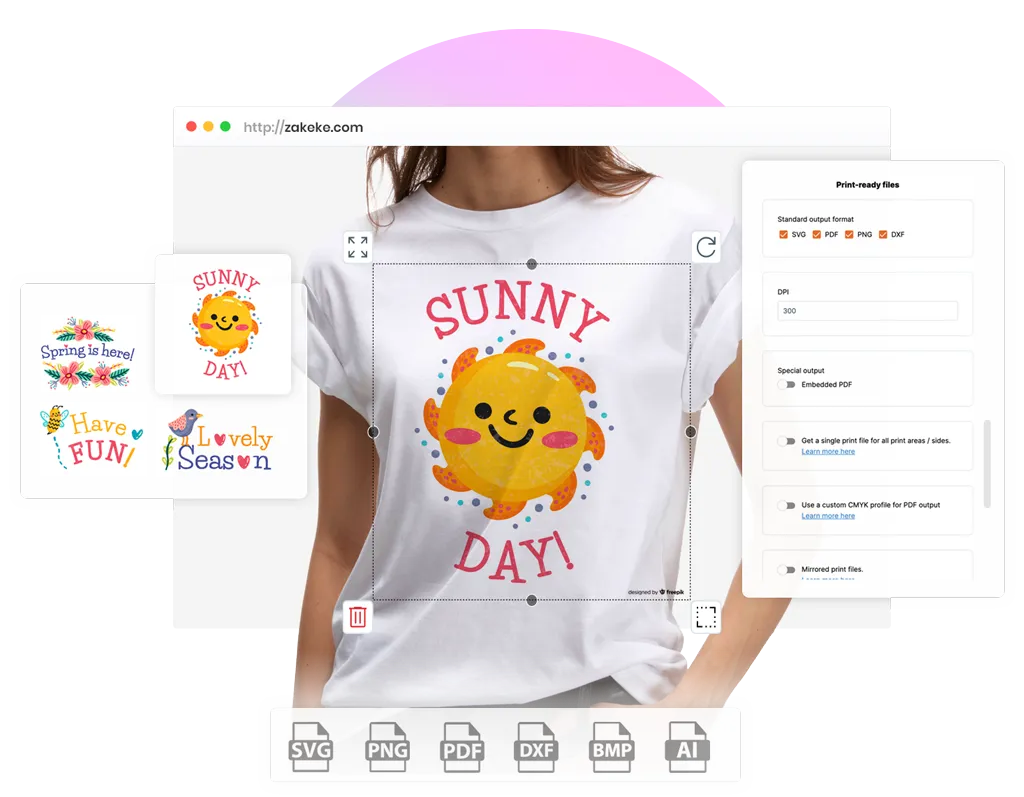

Kickflip describes its visualization as photorealistic, and it is high-quality 2D rendering rather than real-time 3D. Zakeke’s 3D Product Configurator renders the model live, with parts, materials and rules that decide which combinations can be built.
For B2B or high-value products, Zakeke’s Visual CPQ is part of the platform, with Get a Quote next to or instead of Add to Cart. Kickflip offers Configure Price Quote as a paid add-on.
The distinction matters for products with parts: a bike, a sofa, a piece of jewellery with stones and settings. In 2D each option has to be prepared as images; in 3D the model changes as options are chosen and the rules stop combinations that cannot be made. For simple colour and material swaps, 2D layers remain perfectly adequate.
Both are no-code and both can be set up by the merchant without developers. Kickflip is known for a particularly fast first setup.
Zakeke is self-provisioning too: connect the store, configure the products, go live. The difference arrives later: when you need 3D, AR, a second channel, integrations or security certifications, Zakeke’s Enterprise deployment is the same platform, not a migration.
The practical question is who maintains the catalogue once it grows. With Zakeke, options, rules and prices are managed in one back office, and additional sales channels can be connected from the Grow plan, so a second store does not mean building the products again.


Kickflip works with Shopify, WooCommerce and Wix, plus custom stacks. Zakeke runs natively on Shopify, WooCommerce, BigCommerce, Wix, PrestaShop, Magento, Salesforce Commerce Cloud, Shopware, Etsy and more, and adds API, webhooks, Zapier and Order Desk.
If you are on one of Kickflip’s three platforms and certain you will stay, that breadth is worth little. If you run a second store elsewhere, or expect a replatform, it is the difference between one customizer and two, configured twice and maintained twice.
Zakeke also connects analytics and automation tools such as Google Tag Manager, Hotjar and Zapier, so customisation events and orders can be tracked and routed without custom development.
The design file is only the start. Somebody has to get it to production with the order attached, at the right size, in the right colour space, in the right place in the queue. Kickflip hands the file and the order to your store’s order flow and leaves the routing to what you have already built.
Zakeke is built to be connected to your production workflow. Every order carries production-ready files in PDF, PNG, SVG and DXF, generated to the rules you set for DTG, sublimation, screen printing and engraving. The order data then moves where your operation already runs: POD and dropshipping partners such as Printful and CustomCat, Zapier and Order Desk for routing, API and webhooks for your own systems, and PIM and enterprise integrations when the project needs them.


The strongest reason to implement either platform is what happens after the customer finishes. Zakeke constrains designs to what can actually be produced, applies pricing rules and sends production-ready output with its order, so growth in volume does not become growth in headcount.
A proof of concept should measure how many manual checks, artwork adjustments, emails and production steps remain per order on each platform.
Kickflip’s per-sale fee falls toward zero at higher volumes, which is a genuine advantage for high-revenue stores. Zakeke’s answer at that stage is different: fewer manual steps per order, and an Enterprise agreement with customised rates and fees.
Both platforms let you control what customers can change and price options dynamically. With Zakeke you control text, fonts, clipart, images, variants, colours and personalization areas, and build pricing around quantity, setup costs, number of colours and print areas.
The platform supports production-oriented personalization across DTG, sublimation, screen printing and engraving, so the design the customer makes is one your production can actually make.
Zakeke adds rules that matter once products get complex: dynamic pricing rules, bulk variation forms and CMYK and Pantone colour support on Grow, and pricing rules for configurations, dynamic product properties and multiple design areas on Scale.

One of the fairest things to say about Kickflip is that it is an excellent starting point: quick to set up, easy to learn, unlimited products. The question is what happens when it works. When personalised products become a real share of revenue, the demands change: a product that needs 3D or AR, a second platform, production files for engraving, a buyer asking for a quote, a security review from a larger customer. Zakeke’s Starter, Grow and Scale plans and its Enterprise deployment exist so that growth is a plan change rather than a migration.
14-day free trial, standard plans, native ecommerce integrations and a practical route to validate real products quickly.
Product Customizer, 3D Configurator, AR, VTO, Visual CPQ, production automation and 3D asset management as requirements expand.
Tailored architecture and commercial model for complex catalogues, integrations, governance, workflows and larger organizations, with ISO/IEC 27001 certification and a SOC 2 Type 2 audit.
Prices come from each vendor’s public pages and either vendor can change them. Kickflip: USD 59 a month plus a fee from 1.95% down to 0% per custom product sold, unlimited products, a 14-day free trial, paid add-ons such as white label and CPQ, and custom Enterprise pricing. Zakeke: the self-provisioning Starter, Grow and Scale plans are published, with a 14-day free trial, and Enterprise is quoted per account.
Calculate subscription and usage costs together with the add-ons you would need, the platforms you sell on, and the manual work each tool leaves between checkout and production.
Both vendors charge a percentage on custom sales, so neither has a flat-fee advantage at the entry level. The fair comparison is total cost per custom order at your real volume, including the add-ons each side would need for your products.
On G2, Kickflip rates 4.6 out of 5 from 124 reviews and Zakeke rates 4.6 out of 5 from 87 reviews. On the Shopify App Store, Kickflip holds 4.5 from 136 reviews and Zakeke 4.7 from 99.
The ratings are close, so read what reviewers praise. Kickflip reviews talk about ease of use and a fast setup. Zakeke reviews talk about the breadth of the platform, 3D, AR and print files, and about support, with a broader platform taking longer to learn. That is the real trade-off between the two.
In practice, read the most recent reviews on both listings for the products closest to yours: ratings this close say more about fit than about quality.
When you sell on Shopify, WooCommerce or Wix and will stay there; when every product works well as a 2D preview; when you have a large catalogue of simple customisable products; and when fast setup matters more than breadth.
It is also sensible when the team has little time for setup and wants a tool that a non-technical marketer can run alone from day one.
When you need real-time 3D, AR or Virtual Try-On; when production needs SVG or DXF files with order data; when you sell on more platforms or marketplaces; when quoting is part of the sale; and when you want a platform that goes from self-service to Enterprise without a migration.
It is also the better fit when larger customers or partners will ask for security documentation, such as ISO 27001 certification and a SOC 2 Type 2 audit.
If your products only need a couple of extra option fields and no visual preview, a basic product-options app is enough. If you only need a standalone 3D viewer, a full customization platform is unnecessary. If configuration is engineering CAD, specialist engineering software is the right category. In that case, start from the wider picture: Zakeke alternatives compared.
And if the product line is still being tested, a simple variant setup can validate demand before either tool is worth the monthly cost.
Fill in the form to see how brands like yours boost conversions with tailored, hyper-realistic 3D product experiences powered by Zakeke.
Kickflip is better for a simple 2D customizer on Shopify, WooCommerce or Wix with unlimited products. Zakeke is better when you need 3D, AR, Virtual Try-On, production-ready files, more ecommerce platforms or an Enterprise path. Both offer a 14-day free trial.
On G2 both rate 4.6 out of 5: Kickflip from 124 reviews, Zakeke from 87. On the Shopify App Store Kickflip has 4.5 from 136 reviews and Zakeke 4.7.
Kickflip states that thousands of brands use it and that it has powered more than USD 100 million in custom product sales. Brands that need several storefronts, 3D and AR, integrations or security certifications often choose Zakeke, used by more than 25,000 brands and ISO 27001 certified with a SOC 2 Type 2 audit.
Kickflip costs USD 59 a month plus 1.95% down to 0% per custom product sold, with unlimited products and a 14-day free trial. White label and CPQ are paid add-ons.
Among product customizer apps, Kickflip competes on simplicity for Shopify DTC brands, Customily and Teeinblue focus on print on demand, and Zakeke combines a customizer with 3D configuration, AR, Virtual Try-On and production files in one platform.
Both, on the same platform. A small team can start with a 14-day free trial on the Starter, Grow and Scale plans. Larger brands and manufacturers use account-based Enterprise deployments with deeper integrations, governance and ISO 27001 and SOC 2 Type 2 security.
Yes, and it is a normal path. The catalogue stays in Shopify, WooCommerce or Wix and the customizer is what changes. The work is rebuilding the customisable products and their rules, and adding 3D or AR where they help.
This comparison is published by Zakeke and is therefore not independent third-party editorial content. It was prepared using current public product documentation, pricing pages and app-store listings, plus third-party review signals where relevant. The competing product is credited where it is the stronger fit, and prices and ratings come from public sources that can change.