

This summer’s release is one of our biggest updates yet.
We’re introducing new ways to sell customizable products with Mini-Sites, expanding AI across both the customer and merchant experience, continuing the redesign of the Zakeke Backoffice, and launching a completely new interface for the 3D Product Configurator.
Alongside these major updates, we’ve also introduced dozens of improvements designed to simplify product setup, give merchants more control over customization, and speed up everyday workflows.
Here’s what’s new in Zakeke.
1. New Features & AI Improvements
Mini-Sites: a new way to sell customizable products
For years, Zakeke has helped merchants sell customizable products through seamless integrations with the world’s leading eCommerce platforms.
Now we’re expanding Sales Channels with Mini-Sites.
Mini-Sites are hosted, customizable portals that let customers browse products and launch the Zakeke configurator without requiring an eCommerce platform.
They’re perfect for in-store kiosks, showrooms, trade fairs, B2B portals, POS environments, and any experience where customization needs to happen outside a traditional online store.
Mini-Sites can also be combined with Get a Quote to create complete CPQ workflows or integrated with Shopify POS and custom API solutions.
AI becomes even more integrated into Zakeke
We’re continuing to expand the AI ecosystem introduced over the last few releases, bringing artificial intelligence into more stages of both the customer journey and the merchant setup experience.
More visibility for AI Image Generator & Transformer
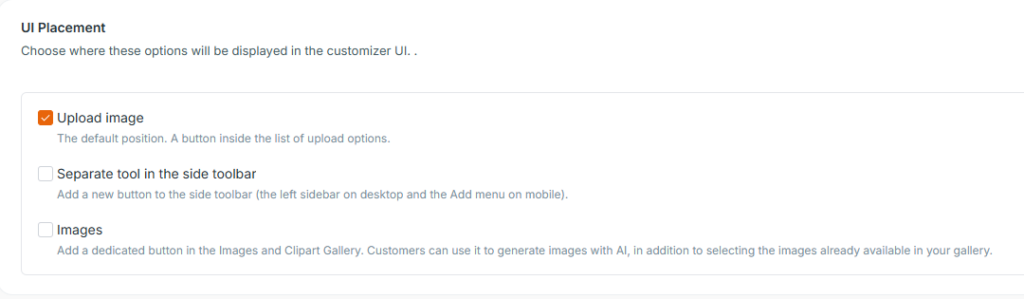
The AI Image Generator & Transformer can now be placed exactly where it makes the most sense inside the Visual Product Customizer.
Merchants can choose whether to display it within image uploads, as a dedicated toolbar button, or directly inside the Images & Clipart Gallery, making AI creation easier to discover and more naturally integrated into each customization workflow.
AI-assisted product setup
Setting up customizable products is now even faster.
New AI-powered utilities can automatically generate:
- Product images
- Product variants
- Print Areas
When generating product variants, AI can even use your existing product images as references, creating missing variations while maintaining the same product style and appearance.
For Print Areas, AI analyzes the product itself to identify the most appropriate printable area instead of relying on predefined placements.
The result is a dramatically faster setup process, especially for large product catalogs.
Ready-to-use content libraries
To reduce setup time even further, we’re introducing two new built-in content libraries.
The new Free Image Pack automatically populates the Images & Clipart Gallery with editable graphics ready for customers to use during personalization.
We’ve also introduced a Background Image Library, providing preloaded backgrounds for the Fill Background feature.
Both libraries become fully editable once imported, allowing merchants to organize, modify, or remove assets according to their needs, with additional themed collections planned for future releases.
For accounts created on or after July 14, 2026, these libraries are available automatically. Existing customers can add them manually, ensuring that their current galleries and configurations remain unchanged.
More control over personalization
This release also introduces several new controls that help merchants better manage the customization experience.
You can now:
- limit image resizing by defining minimum and maximum dimensions
- disable image rotation for uploaded and gallery images
- reposition the Plus button inside the Customizer
- move the footer to the top of the interface, including on mobile devices
Together, these options make it easier to tailor the customization experience to different products, production requirements, and brand guidelines.
Names & Numbers now supports images
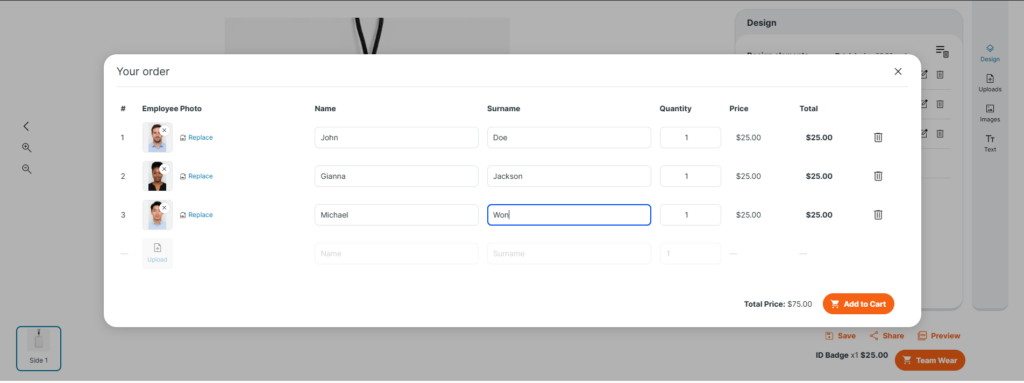
The Names & Numbers feature has been expanded to support image uploads.
Customers can now personalize bulk orders using both text and images, opening new possibilities for products such as employee badges, school IDs, sports uniforms, accreditation cards, and more.
Each item within the same order can include its own individual photo while keeping the rest of the design consistent.
Smarter color management
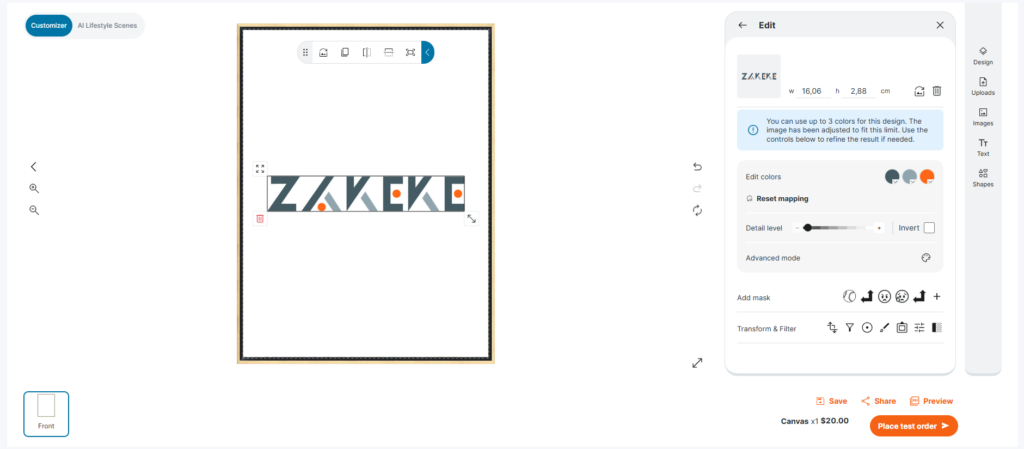
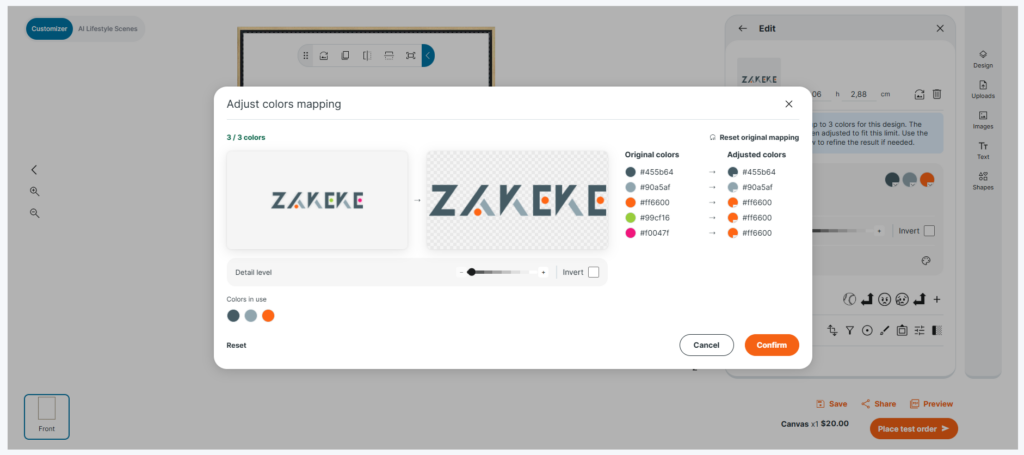
We’ve redesigned the user experience for Color Limit Management inside the Visual Product Customizer.
When a color limit is applied, Zakeke automatically adapts uploaded images while preserving as much visual quality as possible.
The new interface gives customers much more control over the result, introducing intuitive sliders, threshold adjustments, and an Advanced Mode for manually refining color mapping.
This makes the feature especially valuable for production methods such as screen printing, embroidery, monochrome printing, and other processes with limited color availability.
The color limit applies to the entire design, so any additional text or graphic elements added by customers will follow the same color restriction.
Improved CSV import and product creation
Managing large product catalogs is now more flexible than ever.
The CSV import workflow has been redesigned with improved task management, clearer progress tracking, and support for creating products even when some assets are still unavailable.
Incomplete products can later be finalized directly inside the Backoffice using Zakeke’s AI utilities, making it much easier to progressively build large catalogs without delaying imports.
Customers using API integrations can also create incomplete products when assets such as product images or Print Areas are not yet available.
2. The New Zakeke Backoffice Continues to Evolve
Following the first phase released in May, we’re continuing the rollout of the redesigned Zakeke Backoffice.
This second release focuses on improving navigation, organizing features more logically, and making frequently used tools easier to access.
A completely reorganized navigation
The Backoffice now introduces dedicated sections for:
- Customization Experience, where all customer-facing customization tools are grouped together
- Commerce Rules, containing purchasing and pricing logic
- Sales Channels & Modules, including integrations, Mini-Sites and Get a Quote
- Libraries, for reusable assets such as fonts and color palettes
- Platform Settings, where global configuration and UI settings are managed
One of the most requested additions is the ability to star your favorite tools, allowing you to build a personalized navigation menu based on the features you use most.
Several existing sections have also been reorganized to create a more consistent experience across the platform.
Discovery Mode
We’re also introducing Discovery Mode, a completely new testing environment.
Instead of only previewing your current product configuration, you can now experiment with settings that aren’t yet active—testing new Printing Methods, Pricing Rules, personalization tools, and other configurations before making them live.
Once you’ve found the setup you want, you can save it directly from Discovery Mode.
It’s a safer and much faster way to explore new possibilities without affecting existing products.
3. A Brand-New 3D Product Configurator
The 3D Product Configurator introduces a completely redesigned interface.
The redesigned experience introduces cleaner navigation across groups, attributes and presets, one-click configurations, and a built-in AI assistant. Most importantly, the full power of the Zakeke Visual Product Customizer now comes to 3D.
Customers can personalize products with text and images while working seamlessly across both the traditional 2D canvas and the live 3D model, creating a much more intuitive configuration experience.
The new interface is enabled by default for new customers, while existing users can switch between the classic and new UI whenever they want.
This release represents another major step toward making Zakeke easier to use while continuing to expand the platform’s creative and AI capabilities.
From new sales channels and smarter setup tools to a redesigned Backoffice and a completely refreshed 3D Configurator, July’s update brings improvements across every stage of the customization workflow.
And as always, we’re already working on what’s next.

Ready to transform your e-commerce with unique product experiences? Start in under 10 minutes. Start your 14-day free trial or book a demo today!