
Meet Zak, the AI Agent across your Zakeke backoffice
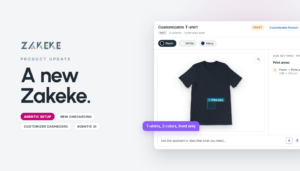
Zak is the next step toward Zakeke Agentic. Say what you want to achieve in plain language, and Zak can help you get there. That might mean answering a quick question about the screen you’re on or handling a setup that spans several areas of Zakeke.
From a quick question to a full setup
When we introduced Zakeke AI in October, you could already use AI to set up a customizable product. What’s new with Zak is where it can work and how much of the setup it can take on. The agent is available throughout the Backoffice, so you can work with it on everything from an individual setting to how your Zakeke setup fits together. See what launched in October
Suppose you’re launching a collection of products that customers can personalize with a name or logo, and you want to charge extra for logo uploads. You can describe the experience and pricing you want to Zak. It can help configure the products, enable the relevant tools in the Customizer, and create the pricing rule. If you’re still deciding how to set it up, you can start by asking Zak how the available settings work.
You decide what gets applied
Zak can handle the setup work, and every change is applied only after you confirm it. You decide when the configuration is ready to go live.
New tools, features and improvements
Get design approvals in one place with Proofing Hub
Give customers and reviewers one place to share feedback and approve designs before production. With the new Proofing Hub, you can send images, PDFs, or products from your catalog for review. Start with a blank product, your own design, or a pre-designed template.
Build a workflow with up to 10 review stages, each with its own reviewers, permissions, and deadlines. Reviewers use a personal link to comment on individual materials, approve them, or request changes. Each comment and decision stays with the version it refers to, so you can see exactly what was approved before production begins.
Learn more Explore the Proofing Hub guide
Design once and reuse across products with Pre-Designed Templates
The Pre-Designed Templates section has been redesigned to make it easier to build templates and use them across your catalog.
Shared templates
Until now, every template started with a specific product. With shared templates, you can start with a neutral design area and structure, then associate the finished template with as many products as you need.
A rebuilt Template Creator
The Template Creator has been rebuilt from the ground up, with a new interface designed to make creating templates faster and more intuitive.
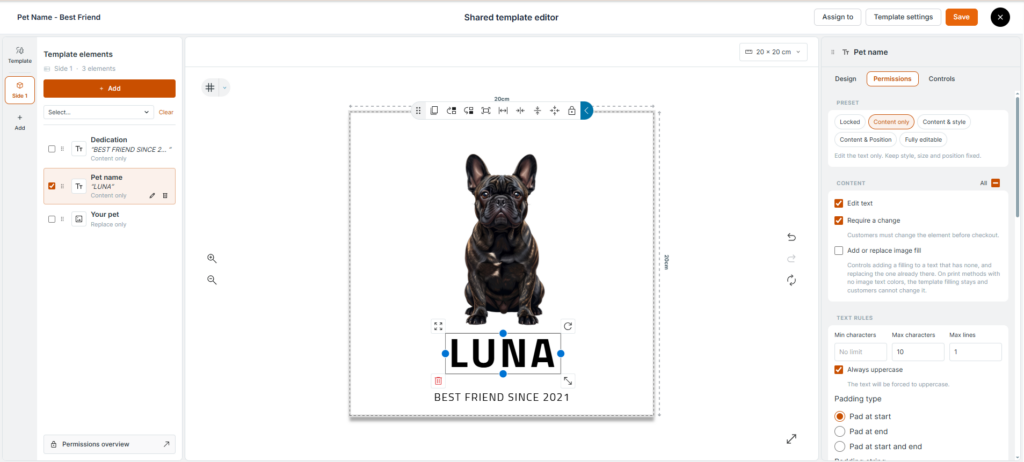
Import print-ready artwork
Already have artwork ready for print? Import an AI, PSD, or PDF file and turn it into a template.
Learn more Learn how to import artwork · Explore the Pre-Designed Templates guide
Find the right Customizer interface with UI Gallery and Express UI
UI Gallery
The new UI Gallery brings the available Visual Product Customizer interfaces together. Browse the options and choose the experience that fits your products and customers.
Express UI
If your customers just need to add a name or upload a logo, Express UI gives them a quicker way to personalize. It’s the first new interface in the gallery and is designed for products with simple personalization options.
Learn more Explore the Express UI guide
Offer an accessible personalization experience
The standard interface of the Visual Product Customizer is now officially compliant with WCAG principles and European accessibility directives. You can offer an inclusive personalization experience to customers who rely on assistive technologies while meeting European accessibility requirements.
Learn more Read the accessibility and compliance guide
More ways to personalize
Extra Image Pack
Give customers more artwork to choose from with the Extra Image Pack. This monthly subscription adds over 1,500 vector images to your Image and Clipart Gallery and complements the Free Image Pack introduced in July.
Learn more Explore the Image and Clipart Gallery · Read the July product update
AI Design Generator now supports TextArt
Customers can now add stylized text to the designs they create through chat using TextArt. More AI Design Generator capabilities are coming in the months ahead.
Learn more Explore the AI Design Generator guide
More customization tools enabled by default
The default printing method now comes with more tools already enabled, so you can give customers more ways to personalize your products with less setup.
New 3D Product Configurator and Engagement UI
Build your 3D configurator in one workspace
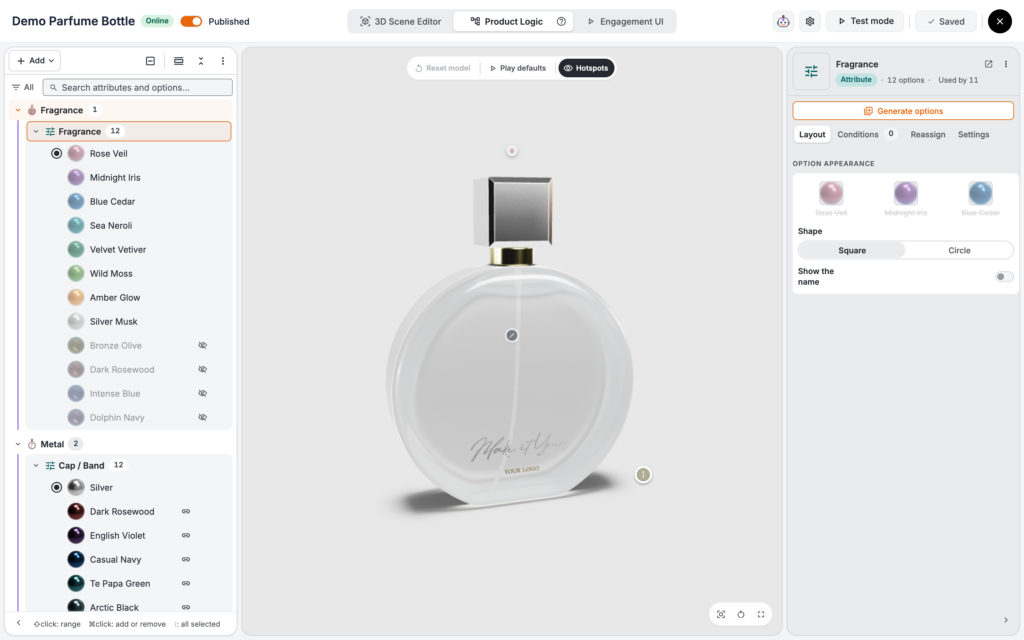
The new 3D Product Configurator Backoffice brings your model, configuration logic, and customer experience into one workspace. Three editors share the same 3D view. Switch between them from the top bar and use one Save across all three. The new Backoffice replaces the previous Composer and Scene Editor.
3D Scene Editor
Organize model parts into groups, choose from a library of physically based materials, and set up the lighting, environment, and cameras. Your cameras also determine which product images appear in the cart and PDF.
Learn more Explore the 3D Scene Editor guide
Product Logic
Product Logic replaces the Composer. Attributes, options, and actions are organized in one list with groups and steps, and each item opens beside the 3D model. Set conditions, prices, customizable areas, and preset configurations where they apply.
Use Generate with AI to create attributes and options from a description of what customers can change. When the product is ready, open Test mode to see the experience as your customers will.
Learn more Explore the Product Logic guide
Guide customers through your 3D products with Engagement UI
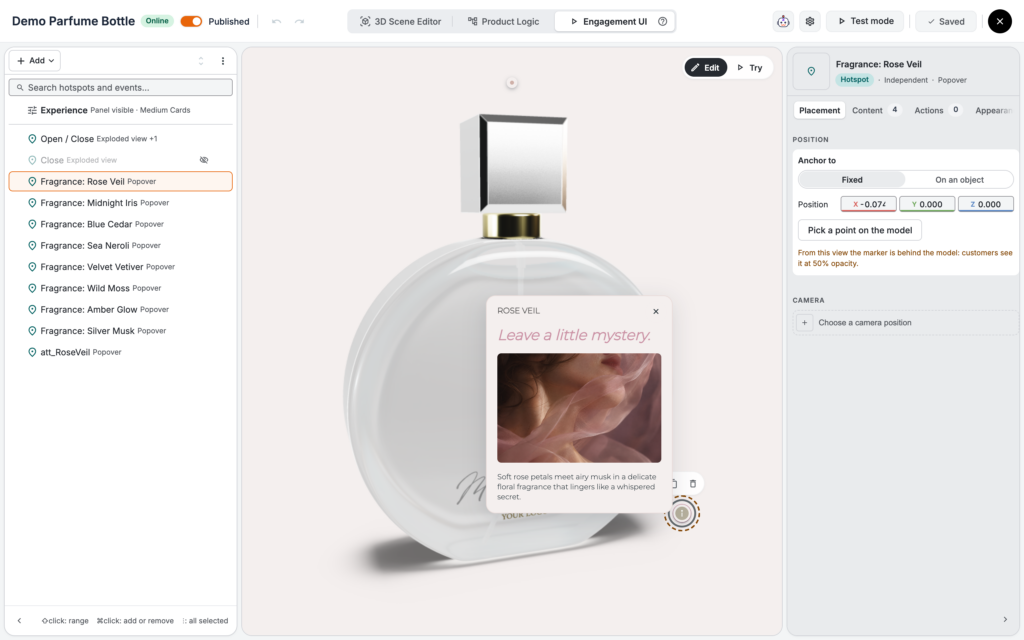
Show customers how a product is made, call out a feature, or let them select an option directly on the 3D model. Engagement UI is the third editor in the new Backoffice. Use hotspots to open Cards and events to trigger actions when the configurator opens or a customer clicks a part.
Hotspots and Cards
Build Cards with Text, Media (images, videos, or Lottie animations), and Button blocks. Add a Product attribute so customers can choose an option inside the Card, or use Product parts to show how the product is made. Hotspots and buttons can also move the camera, select an option, play an animation, or open the exploded view.
Flows and templates
Connect hotspots into a step-by-step experience with Flows. A ready-made template like Guided product tour gets you started in a few seconds. You can even hide the configurator panel so customers can make all their selections through Cards.
Engagement UI is available on the Scale and Enterprise plans.
This release represents a new step in how merchants, and their customers, interact with Zakeke. The nature of our solutions doesn’t change. What changes is how you use them.
From a brand-new onboarding to an agent that sets up your products, this update brings AI from helping you to doing the work for you.
And as always, we’re already working on what’s next.
Ready to transform your e-commerce with unique product experiences? Start in under 10 minutes. Start your 14-day free trial or book a demo today!