

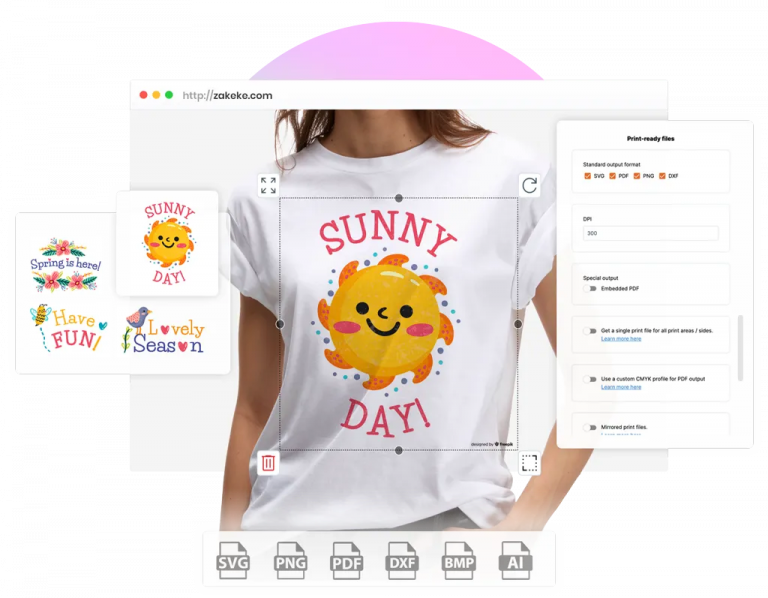
Print buyers now order the way they shop everywhere else: online, at any hour, with a live preview and a price before checkout. Printers that cannot take business cards, packaging, uniforms or engraved gifts on the web lose those orders to printers that can.
This guide explains what web to print software is, how the web to print workflow runs from order to press, which features matter, what the market looks like in 2026 and how to choose the right web2print solution. Every figure links to a source listed at the end.
Web to print software, also called web2print software, is a cloud-based platform that lets customers create, customize, proof and order printed products on a website, while the printer receives the order, the price and a production-ready file in one step. Wikipedia defines web-to-print, or print e-commerce, as commercial printing using websites.
The spellings vary: web to print, web-to-print, web2print, webtoprint and web 2 print describe the same technology, so webtoprint software, web-to-print software, web 2 print software and web 2 print solutions are one category. Whether you call it software for web to print, a web to print system or a web-to-print solution, what changes between web to print solutions is scope.
Some web to print programs only handle file upload and checkout. Others add an online design tool, a pricing engine, approval flows and automated prepress. For a printer, a web to print solution takes the shop online without back-and-forth PDFs. For an e-commerce brand, it turns a static product page into a place where customers build the exact item they want.
| Type | What it does | Best for |
|---|---|---|
| B2C web to print storefront | Public shop with templates, online designer, pricing and checkout | Printers selling cards, flyers, apparel and gifts to consumers |
| B2B web to print portal | Private, login-based catalog with locked brand templates and approvals | Corporate clients, franchises and schools ordering branded material |
| Product customizer app or plugin | Adds live design and print-ready files to an existing Shopify, WooCommerce or other store | Retailers and e-commerce brands selling personalized products |
| All-in-one web2print suite | Storefront, design tool, estimating, MIS and production in one system | Large print companies replacing several tools at once |
| Web to print API | Design tool and file generation connected to a custom front end | Businesses with their own platform and developers |
Web to print technology matters because print demand has shifted toward short runs, personalization and fast turnaround, jobs that are expensive to handle by email. Real-time previews, instant quotes and automated file preparation let a print business accept many small orders without adding prepress staff for each one, sell beyond its city and serve customers outside office hours.

A web to print workflow connects two parts: the web-based interface where the customer designs and orders, and the print production workflow where the order becomes a finished product. Web to print software automates the handoff between the two, so artwork, specifications, price and payment reach production without manual re-entry.
The online interface is the heart of any web to print system. Customers pick a product, upload artwork or start from a template, add text and images, then choose size, material, quantity and finish. A live preview shows the result, and design rules block errors such as text outside the safe area.
Behind the scenes, the platform turns each approved design into a print-ready file with the right dimensions, bleed, color mode and format for the printing method. The order then flows to the production queue, the MIS or a print-on-demand partner, with payment and tracking attached, which reduces errors and protects delivery dates.
| Step | What happens | Manual process | With web to print software |
|---|---|---|---|
| 1. Product selection | Customer picks product, size, material, quantity | Quote requested by email or phone | Options and dynamic price shown instantly |
| 2. Design | Customer adds text, logo, photos or edits a template | Designer builds a mockup | Online design tool with templates and rules |
| 3. Proof | Customer checks the result | PDF proofs sent back and forth | Live 2D, 3D or AR preview, approved at checkout |
| 4. Order and payment | Checkout on the store or portal | Separate invoice and payment | Integrated cart, payment and order record |
| 5. Prepress | Artwork prepared for the machine | Operator rebuilds or checks each file | Print-ready file generated automatically |
| 6. Production | Job routed to the right press or technique | Job ticket written by hand | File and specs sent to queue, MIS or POD partner |
| 7. Shipping | Finished product delivered | Status updates by email | Tracking synced back to the order |
Many web2print solutions also manage reorders and approval chains for B2B accounts, so a franchise can reorder the same branded flyer with a new address in a few clicks.
The main benefits of web2print solutions are lower production cost, more orders and fewer errors. Web to print software removes manual quoting, proofing and file preparation, lets customers order at any hour and makes each custom order repeatable, so print businesses and e-commerce stores can grow volume without growing the prepress team at the same rate.
Customers also want control over the result. When a buyer can leave for a competitor in one click, a clear design tool and an exact preview become part of the value you sell.
The effect is visible at small scale too. La Fabrique à Sachets, a French seed-packet brand on WooCommerce, grew from about 100 to 500-600 orders a month without hiring someone only to manage orders, according to its Zakeke success story.
The web to print software market was worth between USD 1.17 billion and USD 1.43 billion in 2025, depending on the analyst. 360iResearch forecasts USD 1.97 billion by 2032 at a 7.62% CAGR, while Fortune Business Insights projects USD 3.13 billion by 2034 at a 9.11% CAGR.
| Source | 2025 value | Forecast | CAGR |
|---|---|---|---|
| Fortune Business Insights (updated August 2026) | USD 1.43 billion | USD 3.13 billion by 2034 | 9.11% |
| 360iResearch | USD 1.17 billion | USD 1.97 billion by 2032 | 7.62% |
The gap between estimates reflects scope: some firms count storefronts only, others add design tools and print MIS. The direction is consistent. Fortune Business Insights reports that cloud-based deployment holds about 60% of the market, names demand for customized and on-demand printing as the main driver, and lists implementation cost and integration complexity as the main brake for smaller companies.
The wider context agrees. Smithers forecasts digital print value rising from $167.5 billion in 2025 to $251.1 billion in 2035, and McKinsey’s B2B Pulse 2024 found e-commerce had become the top revenue channel for B2B sellers that offer it. Print buyers are part of that shift toward self-serve ordering.
Web to print software is used by print companies and print service providers, retailers and e-commerce brands, corporate marketing teams, schools and agencies. Printers use it to take production orders online, retailers to sell personalized products, and corporations to keep branded material consistent across locations.
Web to print software for printers manages the online sale, production and delivery of finished products such as business cards, books, labels and apparel. Print service providers can also offer it as a service: each client gets its own ordering portal, and the printer secures repeat volume.
Diversification makes this urgent. Profiting Through Convergence, a study by Alliance Insights at PRINTING United Alliance, found that 96% of print providers now operate across multiple print segments. Selling packaging, promotional products and apparel next to commercial print is far easier with one online front end.
Retail web to print lets shoppers personalize products such as packaging, gifts, drinkware and apparel directly in the online store. In web to print retail, a new design template goes live in minutes instead of a new production run, so brands differentiate and react to trends faster. Our guide to product customization for e-commerce covers the retail side in depth.
Designers build the templates and rules behind web 2 print projects: layouts, fonts, editable zones and product options, so every customer design stays within brand guidelines and production limits.
Web to print ecommerce is the use of web to print software inside an online store: shoppers design a product on the product page, see a live preview, pay at checkout, and the order generates a print-ready file for production. The strongest web to print ecommerce solutions run as native apps on Shopify, WooCommerce and similar platforms rather than as a separate site.
Customizable products are hard to copy because the value lies in the customer’s own design. A live product customizer also answers the two questions that block the purchase: what will it look like, and what will it cost.
Before choosing among web to print website templates and tools, settle who owns the web to print process, whether the solution runs on your current systems, how customers will find it and how orders will be fulfilled. The selection section below turns these into a checklist.
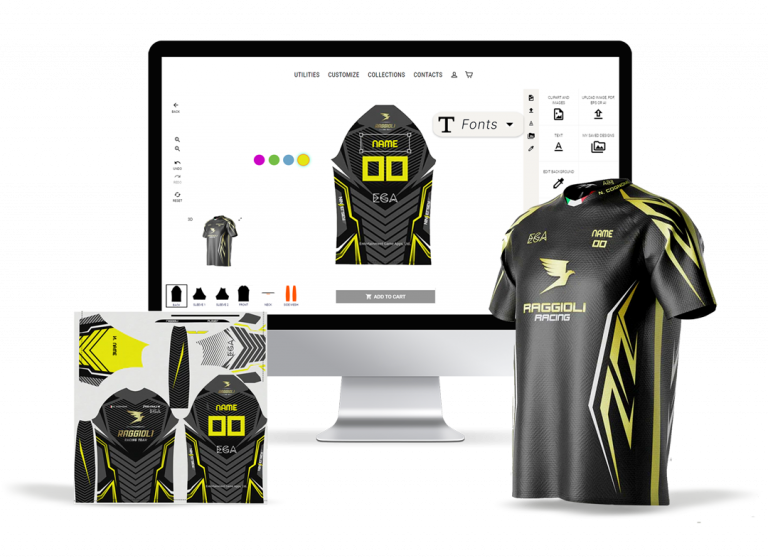
Integration decides whether web to print software pays off. A web to print platform must connect to the store or CMS you already use, and to the order, ERP or CRM systems behind it, so orders, prices and files move automatically. A tool that forces you to rebuild the store or re-key orders adds cost instead of removing it.
Test the integration with your real catalog before signing. One complex product, one bulk order and one reorder reveal most gaps between a demo and daily operations.
It all starts with integration: if orders, prices and files do not flow automatically, a web to print system only moves manual work to a new screen.

The key features of web to print software are an online design tool, automatic print-ready files, dynamic pricing, support for several printing methods, integration with e-commerce and business systems, and a fast, mobile-friendly interface. The checklist below also works as a scorecard when you compare web to print design software vendors side by side.
| Feature | Why it matters | What to check in a demo |
|---|---|---|
| Web to print design tool | Customers create or edit designs without a designer | Text, images, cliparts, templates, mobile usability |
| Configuration options | Every product variant can be customized | Size, material, color, print sides, no hard limits |
| Print-ready files | Removes manual prepress | Formats (PDF, PNG, SVG, DXF), resolution, bleed, color mode |
| Dynamic pricing | Price follows quantity, material and options | Live price updates, bulk tiers, quote flow for B2B |
| Printing methods | One tool covers the whole catalog | DTG, sublimation, screen printing, engraving |
| Integrations | Orders and files flow automatically | Native app for your platform, API, ERP, CRM, MIS |
| POD and dropshipping | Fulfillment without extra tools | Connectors to POD partners and order management |
| 3D and AR preview | Fewer doubts before purchase | Real-time 3D, AR on mobile, page speed |
| Design rules | Prevents unprintable orders | Print areas, safe zones, image resolution alerts |
| Support and updates | Keeps the system current | Onboarding, documentation, response times, release notes |
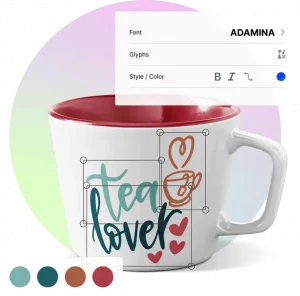
A visual customizer is the part of web to print software that customers touch. Look for unlimited configuration options, flexible printing methods from sublimation to engraving, POD and dropshipping integrations for efficient fulfillment, and 3D viewing and augmented reality so customers inspect their design before buying, which helps reduce returns. It must also work on any device and screen size.
For B2B catalogs with complex price logic, pair the design tool with a visual CPQ for configured quotes, so large orders get an accurate price without waiting for a sales call.
The best web to print software is the one that fits your market, catalog, fulfillment model and existing store. Answer five questions first (B2B or B2C, products, traffic, fulfillment, ownership), then compare an all-in-one web2print suite, custom web to print software and a customizer app on time to launch, upfront cost and flexibility.
| Approach | Time to launch | Upfront cost | Best for | Not ideal when |
|---|---|---|---|---|
| All-in-one web2print suite | Months | High, often with setup fees | Large printers replacing estimating, MIS and storefront | You already run a working e-commerce store |
| Custom web to print software | Longest | Highest, plus maintenance | Unique workflows no product covers | Budget or developer time is limited |
| Customizer app or plugin | Days to weeks | Low, monthly subscription | Printers and brands selling on Shopify, WooCommerce and similar | You need a full print MIS in the same tool |
| Web to print API | Weeks | Medium, developer time | Custom platforms and marketplaces | No in-house or agency developers |
Lists of top web to print software rank vendors by feature count, but the last column separates a good fit from an expensive migration. Ask each vendor for a trial on your own products and check pricing at your expected order volume.
The main challenges in web to print implementation are technical integration, customer and staff adoption, data security and keeping the platform current. Most failed projects come from choosing a web to print system that does not fit existing tools, or from launching without testing real orders end to end.
Web to print software does not pay off for every print business. If most jobs are unique, high-value projects that need consultation, such as art books, complex installations or one-off displays, a quote form and an experienced account manager serve customers better. The same applies when order volume is very low or the catalog cannot be standardized into templates and options.
In those cases, start with a small online catalog of repeatable products, such as business cards or branded merchandise, and expand automation once volume justifies it.
Web2print success stories share one pattern: once customers design products online and print-ready files are generated automatically, order volume grows without a matching increase in staff. The examples below are Zakeke customers, and each result comes from the published case study.
La Fabrique à Sachets, specializing in personalized seed packets, sought a solution to automate custom file production for tailored orders. By implementing a web2print customizer:
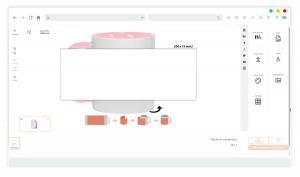
Original People is a Spain-based company offering different custom products, from mugs to wine tumblers. They need to grow up sales without losing too much time in the custom files production.
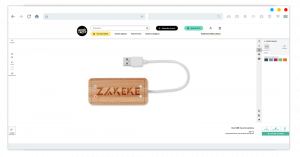
Meet Good Act is a french company specializing in customizable corporate gadgets and gifts. They needed to automate the process of creating custom print-ready files.
The main trends in web to print for 2026 are AI and automation across design and prepress, the convergence of print segments into one online storefront, and sustainability through on-demand production. All three reward print businesses whose web to print platform can take any product and turn it into a validated, production-ready order.
AI is entering web2print solutions at both ends: helping customers generate and fix designs, and helping printers check files, route jobs and read customer preferences. The practical test for any AI feature is simple: does it remove a manual step between order and press, or does it only add another screen?
With 96% of print providers already serving several segments, according to Alliance Insights, web to print companies need one catalog and one design tool that covers commercial print, packaging, apparel and promotional products, each with its own printing method and file requirements.
Printing only what has been ordered reduces overproduction. Web to print solutions support eco-friendly practices by cutting misprints, optimizing resource use and making short runs economical, which also appeals to environmentally conscious buyers and corporate procurement policies.
Zakeke is a visual commerce platform whose Visual Product Customizer works as web to print software for printers, retailers and e-commerce brands. Customers design products directly on your store, and every order arrives with its production file, ready for the press.
The best web to print software depends on the business model. Large printers replacing several systems often choose an all-in-one web2print suite, while printers and brands already selling on Shopify or WooCommerce launch faster with a customizer app offering automatic print-ready files, dynamic pricing and native integration.
Yes. Web to print, web-to-print, web2print, webtoprint and web 2 print are spellings of the same term. All describe software that lets customers create and order printed products online, with the order and production file passed automatically to the printer.
Web to print is the software front end that lets customers design, proof and order printed products online. Print on demand is a production model where an item is printed only after it is ordered. They often work together: the web to print platform collects the file, and a press or POD partner produces it.
Yes. Many web to print platforms, Zakeke included, offer an API so businesses with a custom storefront, marketplace or ERP can embed the design tool and receive print-ready files programmatically. Merchants on Shopify, WooCommerce or similar platforms usually go live faster with a native app.
Web to print software ranges from a monthly subscription for customizer apps to license, setup and maintenance fees for all-in-one or custom-built systems. Zakeke self-serve plans start at EUR 59 per month with a 14-day free trial, while enterprise web to print solutions are quoted on catalog, volume and integrations.
Yes. Retail web to print lets shoppers personalize packaging, gifts, drinkware and apparel directly in an online store. The retailer receives each order with a production file, prints in-house or through a partner, and ships, adding personalized product lines without adding design staff.