April 2022 Release Notes
A brand new tool that allows you to prevent your customers from using offensive language and not-allowed images to customize your products, plus mirrored print files and new UX options inside the Configurator
Home Ā» Product Updates Ā» Pagina 3

A brand new tool that allows you to prevent your customers from using offensive language and not-allowed images to customize your products, plus mirrored print files and new UX options inside the Configurator

Sales Channels makes it easier for merchants, agencies and existing partners to manage and sell products across all of their channels and stores using just one Zakeke account.

Your feedback is the best source of inspiration for Zakekeās improvement. We hardly worked and are working to make Zakeke experience ever simpler, faster and more intuitive. This release includes several bug fixings. Take a look at all updates of Zakeke PDF Preview: We added the possibility to customize the PDF preview: merchants can allow people to download a PDF of the personalization they’ve done. The pdf is now standard. We made it customizable now, so you can have your own logo on it, the texts you want and so on. Visit the support page to learn more on PDF Preview. Click here. Shapes: Merchants can now re-order the categories inside the Shape Feature. Visit the support page to learn more on Shapes. Click here. Get a quote: a few improvements, including getting in the quote request more information on the product for which the customer is requesting for a quote and possibility for the merchant to manually change the status of the quote (accepted, rejected, …) and even cancel it (cancelled). Visit the support page to learn more on Get a Quote. Click here. Stay up to date and follow us on LinkedIn, Facebook and Instagram.

3D & AR Viewer Launch Create Unique 3D Visual Experiences, Everywhere! Giving consumers a better understanding of a product is proven to increase conversions and reduce returns. Zakeke’s platform allows consumers to virtually see the product in their home true to size. Implement 3D & AR at scale in a matter of minutes. Upload a 3D model and Zakeke instantly creates an optimized, sharable 3D version with built-in AR capabilities. Embed it on your website, in your e-commerce store, or use the QR code, simple as that. Centralize your Visual assets to make collaboration more efficient for all stakeholders. Create a single source of truth for all 3D models from design to manufacturing to commerce. This is Zakeke, this is our new innovative solution, for all. Please take a look at this help guide to set your product up and start using our new tool. This is not enough, there is more. Keep reading.. Take a look at all updates of the Visual Customizer Text Shadow: you can activate a feature to allow customers to add shadow to texts. It’s flexible as they can choose to limit colors and how the shadow can be rotated and moved behind the text. Read more here Make customization of a side mandatory: this means that when you create your customizable product you can make it so that customers cannot buy the item if they haven’t customized a given side of the product (or all of them). You can set it by checking the flag for “make customization mandatory” when you create the product sides. More flexibility over the UI: you can now give a custom size to the small 3D view window in the product page interface. Read this Updates of the 3D Product Configurator Skybox: Zakeke now allows you to add a skybox (aka: a background) to your 3D model and you can make it blurred too. We have updated the library of properties that you use to make effects for the 3D and added the following ones. Clear Coat, an effect that simulates a paint effect, just like when you add transparency to a paint on a car, furniture etc.. Anisotropic, it’s the effect that you see as light reflects on surfaces such as cd-rom. See this. Sheen, effect applicable for particular fabrics. Subsurface, it simulates the diffusion of the light on certain material, such as skin, wax. Think about when you put a light behind your finger and you see the light on the other side. Well, just like that. The above works on the 3D view of the Customizer as well. Stay up to date and follow us on LinkedIn, Facebook and Instagram.


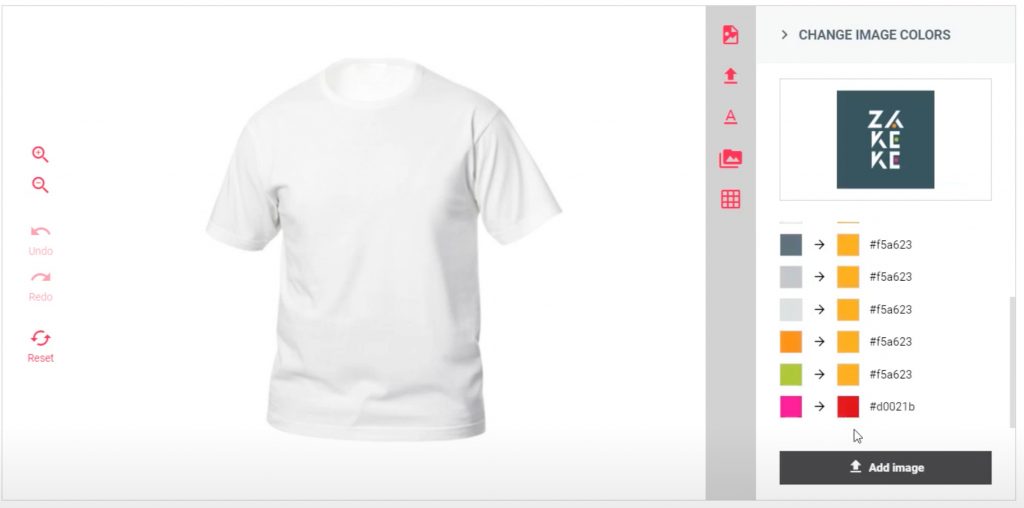
1- Forcing the design to be a single color or a limited number of colors We developed this new features based on your requests as many of you do screen printing or just need to limit the number of colors that the customer can use to create the design to personalize your items. When you activate this function you can set a limited number of colors and you can decide whether to leave the customers free to choose any color from a color picker or offer only a limited range of colors. Customer will be able to use only that number of colors to create their designs. See this short video below Read more here. 2- New text functions We worked to improve the text tool to make it more powerful. We added: You find these new functions in the text section in the Printing Methods. Read here if you wish to know more on how the text tool works in Zakeke. 3- Integrations with Hotjar and Google Tag Manager Zakeke now allows you to add Hotjar and Google Tag Manager to your account. You can use Hotjar to understand how your customers use the customizer at your website. Goolge Tag Manager allows you to add tags to analyze how users interact with your Zakeke. Read here to know how to use Hotjar and Google Tag Manager. 4- New color picker The new color picker makes it easier for your customers to re-use colors in a design as it shows last colors used and colors in use in the design. 5- Etsy A couple of news for those who use Zakeke with Etsy: Stay up to date and follow us on LinkedIn, Facebook and Instagram.
1- Erzwingen einer einzelnen Farbe oder einer begrenzten Anzahl von Farben für das Design Wir haben diese neue Funktion auf der Grundlage Ihrer Anfragen entwickelt, da viele von Ihnen die Siebdruck-Technik verwenden oder einfach nur die Anzahl der Farben begrenzen müssen, die der Kunde für die Erstellung des Designs verwenden kann, um Ihre Artikel zu personalisieren. Wenn Sie diese Funktion aktivieren, können Sie eine begrenzte Anzahl von Farben festlegen und entscheiden, ob die Kunden eine beliebige Farbe aus einem Farbwähler wählen können oder ihnen nur eine begrenzte Auswahl an Farben angeboten wird. Die Kunden können dann nur diese Anzahl von Farben für ihre Entwürfe verwenden. Sehen Sie sich dieses kurze Video an Mehr dazu hier. 2- Neue Textfunktionen Wir haben das Text-Tool verbessert, um es leistungsfähiger zu machen. Was wir hinzugefügt haben: Diese neuen Funktionen finden Sie im Textteil der Druckmethoden. Lesen Sie hier, wenn Sie mehr darüber erfahren möchten, wie das Text-Tool in Zakeke funktioniert. 3- Integrationen mit Hotjar und Google Tag Manager Zakeke ermöglicht es Ihnen jetzt, Hotjar und Google Tag Manager zu Ihrem Konto hinzuzufügen. Sie können Hotjar verwenden, um zu verstehen, wie Ihre Kunden das Produktanpassungs-Tool auf Ihrer Website nutzen. Mit Google Tag Manager können Sie Tags hinzufügen, um zu analysieren, wie Benutzer mit Ihrem Zakeke interagieren. Lesen Sie hier, wie Sie Hotjar und Google Tag Manager verwenden können. 4- Neuer Farbwähler Mit dem neuen Farbwähler können Ihre Kunden Farben einfacher in einem Design wiederverwenden, da er die zuletzt verwendeten Farben und die aktuell verwendeten Farbenin dem Design anzeigt. 5- Etsy Ein paar Neuigkeiten für alle, die Zakeke mit Etsy verwenden: Bleiben Sie auf dem Laufenden und folgen Sie uns auf LinkedIn, Facebookund Instagram.

The support team can make a difference for the success of a product. In Zakeke, we put customers at the center of our activities. And this paid us back for the success of our product customizer & 3D configurator.

Das Support-Team kann entscheidend zum Erfolg eines Produkts beitragen. Bei Zakeke stellen wir unsere Kunden in den Mittelpunkt. Und dafür wurden wir durch den Erfolg unseres Produktanpassungs-Tools und unseres 3D-Konfigurators belohnt.

Advanced Printing Methods, Show Design Size, Edit Print-File & New Bleed Line Settings are the latest innovation inside our Visual Commerce Platform, let’s dive in and discover more!

Despite the pandemic, 2020 was an important year for Zakeke. +3 million of personalized product and up to 250% conversion rate on product page. We thank you for your trust and we do not stop improving our tools to offer you the best. We plan a better 2021 that will take Zakeke to the next level. Weāve just released a new version of Zakeke, everything good is staying and weāre adding some features and some improvements to help make you even more successful with Zakeke. The release includes several bug fixings. Print full-color on wood In November, we released a suite of features that will make easier to simulate a real engraving effect on product. Using Zakeke, customers now know exactly what they will receive and how an effect looks like. Today we apply the same concept to print on wood. The new feature allows you to create an effect showing the real effect of personalization on wood. How it works? When creating a Printing Method, enable the Print on Wood in Full Colors feature in the Effect section. Set an effect to simulate printing on your wooden product and the design gets the desired effect. Zakeke offers pre-made effects you can edit. An effect is composed of a blend mode and a level of opacity. Read our guide here to discover more. Personalize āCUSTOMIZEā button Watchword in Zakeke is customization. Not just product customization. At Zakeke, you can customize our tool as well. From today, it is possible to personalize the “Customize” button in Zakeke Product Configurator with another word. āCustomizeā button is that one opens the design section. Not clear? See the below picture. Coming soon⦠We are working to offer you new amazing features. A lot of interesting things are coming soon. Zakeke already supports Printful for Shopify and WooCommerce. In the coming months, the integration will also be extended to BigCommerce. Our customers with a store on BigCommerce will soon be able to choose a product from the Printful catalog on Zakeke for an easy and fast personalization. In the next few weeks, we will introduce Shapes. A new tool that enhances product configuration in Zakeke back office. You will be able to create complex print areas where each shape is independent. Think of a festoon full of shapes where the customer can upload an image in every single shape. There are many things you can do with Shapes. The feature will be released in the coming weeks. Stay up to date and follow us on LinkedIn, Facebook and Instagram